


QUICK TRANSFERS, Pay into this Account:
1481900827 | ACCESS BANK | EMMANUEL OLUWASEUN OTOBOR
Once your payment is successful kindly send the “PAST QUESTION” you need, your “ACCOUNT NAME” and “EMAIL ADDRESS” to 08039822082. or info@mannyspark.com


How to Check Admission Status on JAMB CAPS Portal: Step-by-Step Guide for Nigerian Students
As a Nigerian student navigating the complex world of tertiary education admissions, understanding how to check your admission status on the JAMB CAPS portal is crucial. The Joint Admissions and Matriculation Board (JAMB) plays a pivotal role in ensuring fair and transparent access to universities, polytechnics, and colleges across Nigeria. In this detailed article, we’ll dive deep into every aspect of the process, from the basics to advanced tips, ensuring you’re well-equipped to monitor your admission journey.
I’m Dr. Manny, founder of Manny Spark, a leading educational consultancy in Nigeria dedicated to guiding students through JAMB, UTME, and admission processes. With years of experience helping thousands secure their dream spots in Nigerian institutions, I know the frustrations and triumphs involved. If you need personalized assistance, feel free to contact me at 08039822082 . At Manny Spark, we offer services like JAMB registration support, mock exams, and admission strategy sessions to make your path smoother.
This guide is tailored for Nigerian students, drawing from official JAMB resources and real-world insights. We’ll cover the history of JAMB and CAPS, detailed steps, common pitfalls, and more. Whether you’re a first-time UTME candidate or seeking direct entry, this educational resource will empower you. Let’s get started!
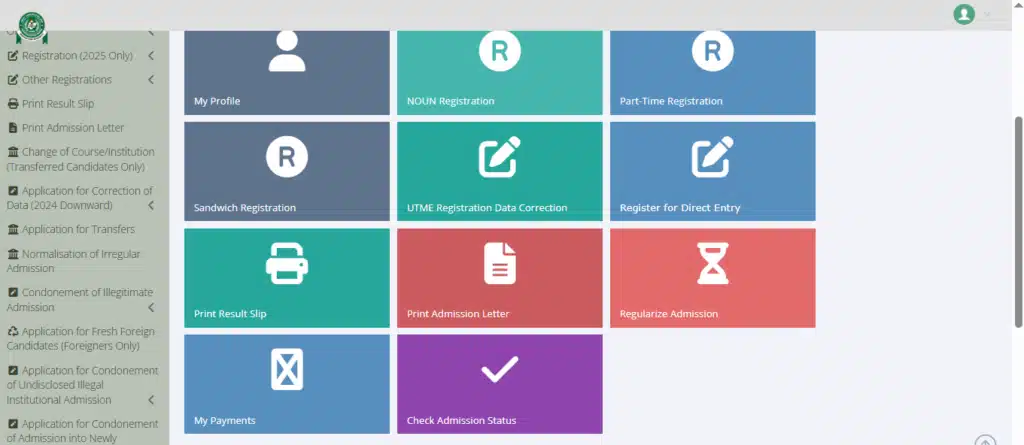
How to Check Admission Status on JAMB CAPS Portal.
Understanding JAMB and Its Role in Nigerian Admissions
The Joint Admissions and Matriculation Board (JAMB) is the cornerstone of tertiary education admissions in Nigeria. Established to standardize and regulate entry into universities, polytechnics, and colleges of education, JAMB ensures that every qualified student has a fair shot at higher education.
JAMB’s mandate, as defined by the Federal Government, includes conducting the Unified Tertiary Matriculation Examination (UTME), processing admissions, and maintaining a centralized system to prevent malpractices. For Nigerian students, this means that your journey to university begins with JAMB – from registration to final admission.
In a country like Nigeria, where over 1.5 million candidates sit for UTME annually, JAMB’s role cannot be overstated. It bridges the gap between secondary school leavers and tertiary institutions, promoting equity across states like Lagos, Abuja, Kano, and rural areas in states like Borno or Enugu.
Bold fact: According to official data, JAMB has processed over 20 million admissions since its inception, making it one of Africa’s largest examination bodies.
Beyond admissions, JAMB influences educational policy, such as setting cut-off marks and enforcing guidelines on catchment areas. For instance, students from educationally less developed states (ELDS) benefit from special considerations, highlighting JAMB’s commitment to national unity. In 2025, the policy meeting approved minimum scores: Universities at 150, Colleges of Nursing at 140, and Polytechnics at 100, reflecting ongoing adjustments to meet national needs.
As Dr. Manny from Manny Spark, I’ve seen how misunderstanding JAMB’s processes can lead to missed opportunities. That’s why education on tools like CAPS is vital. If you’re stuck, call us at 08039822082 or 09051720414 for expert guidance.

To delve deeper, let’s explore the history that shaped this system.
The History of JAMB CAPS: Evolution of Admission Processing in Nigeria
The story of JAMB begins in the 1970s, a time when Nigeria’s tertiary education was fragmented. Before JAMB, each university handled its own admissions, leading to inefficiencies, duplications, and favoritism. In 1978, the Federal Military Government promulgated Act No. 2, establishing JAMB to centralize the process.
Early days saw JAMB conducting paper-based exams, with results manually processed. By the 1990s, computer-based testing (CBT) was introduced to combat cheating and speed up results. However, admission processing remained manual until the 2010s.
The Central Admissions Processing System (CAPS) was launched in 2017 by then-Registrar Prof. Ishaq Oloyede to automate and transparentize admissions. CAPS addressed issues like “admission racketeering” by allowing candidates to monitor offers in real-time, accept or reject them, and ensure institutions adhere to guidelines.
Quote from Prof. Oloyede: “CAPS restores autonomy to institutions while ensuring transparency for candidates.” This innovation reduced processing time from months to days and minimized human interference.
In 2025, CAPS has evolved with features like SMS notifications, USSD access, and integration with the National Identity Management Commission (NIMC) for biometric verification. This history underscores JAMB’s adaptation to Nigeria’s growing population and technological advancements, making it easier for students in urban centers like Lagos or remote areas like Maiduguri to access services.
At Manny Spark, we educate students on this evolution to build confidence. For historical insights or admission strategies, contact Dr. Manny at 08039822082
Now, let’s break down what CAPS really is.
What is the JAMB CAPS Portal? Key Features and Benefits
The JAMB CAPS (Central Admissions Processing System) portal is an online platform where candidates check, accept, or reject admission offers from Nigerian institutions. Accessible via caps.jamb.gov.ng or the e-Facility at efacility.jamb.gov.ng, it’s integrated with the JAMB e-Facility portal for seamless access.
Key features include:
- Real-time admission status updates via web or mobile.
- Marketplace for alternative offers if your first choice rejects you.
- Biometric verification to prevent impersonation.
- Integration with UTME and Direct Entry (DE) results, including O-Level uploads.
- SMS and USSD options for low-data access.
For Nigerian students, CAPS offers transparency – no more waiting endlessly for letters. Benefits extend to institutions, which upload lists for JAMB approval, ensuring merit-based admissions. In 2025, enhanced mobile compatibility makes it accessible even in areas with poor internet, like rural Ogun or Akwa Ibom states.
Always use a secure browser like Chrome or Firefox for CAPS to avoid glitches.
In educational terms, CAPS democratizes access, especially for students in remote areas like Sokoto or Calabar, who can check status without traveling. It also prevents multiple admissions, ensuring slots for deserving candidates.
As part of Manny Spark‘s services, we provide CAPS monitoring workshops. Reach out at 08039822082 for enrollment.
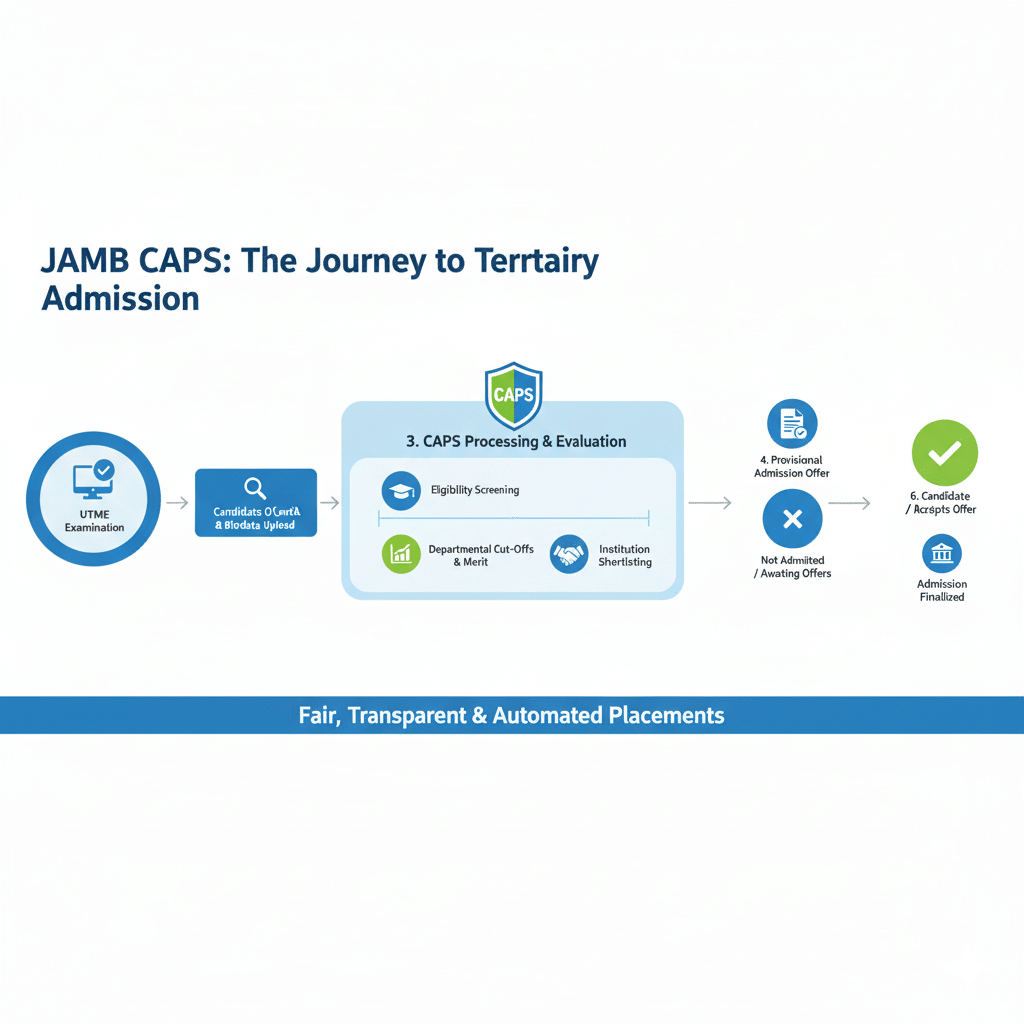
JAMB Office Locations in Nigeria and Services Offered
While CAPS is online, physical JAMB offices are essential for in-person support. JAMB’s national headquarters is located in Bwari, Abuja, at Suleja Road, P.M.B. 189, Garki. This central hub oversees national operations, including policy decisions and high-level complaint resolutions.
Nigeria has JAMB offices in all 36 states and the FCT, ensuring accessibility. Here’s a detailed table of select locations and services, expanded for 2025 operations:
| State | Office Location | Key Services Offered |
|---|---|---|
| Abuja (FCT) | National Headquarters, Bwari, Abuja | Policy formulation, complaint resolution, UTME registration oversight, admission processing, national data management, and 2025-specific seminars on CAPS updates. Phone: +2348166335513. |
| Lagos | Annex Office, 11 Ojora Road, Ikoyi, PMB 12748 | CBT center accreditation, result corrections, student consultations, O-Level upload assistance, and workshops on digital admissions. Coordinator: Mr. Biliaminu Shitu. |
| Enugu | State Office, Enugu | Registration for UTME/DE, change of course/institution, mock exams, CAPS troubleshooting sessions, and support for eastern zone candidates. Known for efficient service in handling high-volume queries. |
| Kano | State Office, Kano | Biometric enrollment, admission letter printing, support for northern candidates, and 2025 outreach programs for ELDS students. |
| Ogun | State Office, Abeokuta | Complaint handling, syllabus distribution, partnership with local CBT centers, and free advisory on CAPS mobile access. |
| Akwa Ibom | State Office, Uyo | UTME result checking assistance, direct entry processing, educational seminars, and assistance with NIMC integration for biometric verification. |
| Rivers | State Office, Port Harcourt | Admission status verification, change of data services, and collaborations with oil-producing state institutions for specialized admissions. |
| Kaduna | State Office, Kaduna | Handling of mass registrations, fraud reporting, and training on USSD CAPS checks for low-connectivity areas. |
These offices offer a wide array of services beyond online portals:
- Registration and Exams: UTME, DE, mock tests, and 2025 CBT simulations.
- Corrections and Changes: Data amendments post-registration, including course or institution swaps.
- Support Services: Ticketing for complaints via COSS (Central Online Support System), O-Level result uploads, and biometric fixes.
- Other Offerings: Partnerships for CSR like sports and teaching programs, API integrations for third-party services, and 2025-specific guidance on minimum cut-off scores.
- Educational Outreach: Seminars on avoiding admission scams, especially prevalent in urban areas like Lagos.
For example, the Lagos annex is strategically placed in Ikoyi for urban access, offering walk-in CAPS demos, while rural offices like in Adamawa (Yola) focus on outreach to underserved communities. Visiting an office? Bring your NIN, registration slip, and any relevant documents for faster service.
At Manny Spark, we recommend visiting your nearest office for verification, especially if online access is challenging. Contact Dr. Manny at 09051720414 if you need directions, proxies, or accompaniment.
[Image Placeholder: Map of Nigeria highlighting JAMB office locations in major states.]
Prerequisites for Checking Admission Status on JAMB CAPS
Before logging in, ensure you meet these requirements to avoid frustration:
- JAMB Profile: Created during UTME/DE registration with a valid email and password. If forgotten, reset via the portal.
- Registration Number: Your unique 10-digit JAMB number from your slip.
- Internet Access: Stable connection; use a smartphone, computer, or cyber cafe in areas like Abuja or Ibadan.
- NIN Integration: Linked for biometric verification – essential in 2025 for security.
- Payment Status: Cleared any pending fees via Remita, including for admission letters.
- O-Level Results: Uploaded if previously “awaiting,” as this can block status views.
- Registered SIM: Active for SMS/USSD confirmations.
Italic note: If you’ve lost your password, reset it via the e-Facility portal using your registered email. For SIM issues, visit a JAMB office.
Nigerian students often overlook these, leading to delays during peak seasons. Prepare early to avoid rush-hour portal traffic, especially post-UTME in September-October 2025.
For help setting up, Manny Spark offers free consultations – call 08039822082.
Step-by-Step Guide: How to Check Your Admission Status on JAMB CAPS
Here’s the core of our guide, expanded with detailed instructions for 2025. We’ve included methods for computers, mobiles, alternatives, statuses, and troubleshooting to make this educational and comprehensive. Follow these steps meticulously for success.
Checking on a Computer
For desktop or laptop users, this is the most straightforward method:
- Visit the Official Portal: Open your browser and go to efacility.jamb.gov.ng or directly to the CAPS section via caps.jamb.gov.ng. Use Chrome for best compatibility.
- Log In: Enter your JAMB-registered email address and password. If it’s your first time, you might need to use your registration number to set up.
- Access Admission Status: Once logged in, click on “Check Admission Status” from the dashboard.
- Select Exam Year and Enter Details: Choose your exam year (e.g., 2025) and input your JAMB registration number.
- Access CAPS Dashboard: Click “Access my CAPS” to enter the main interface.
- View Your Status: Navigate to “Admission Status” and click to display your current standing. If admitted, you’ll see options to accept or reject.
Bold tip: Take screenshots at each step for records, especially if status is “In Progress.”
This process typically takes 5-10 minutes on a stable connection.
Checking on a Mobile Phone
Mobile access is crucial for Nigerian students on the go, especially in 2025 with improved portal responsiveness:
- Open Browser and Visit Portal: Use Chrome on your Android or iOS device to go to efacility.jamb.gov.ng.
- Log In: Enter your email and password as on computer.
- Navigate to Status Check: Tap “Check Admission Status.” If you see only a welcome page, switch to desktop site mode (tap the three dots in the top-right corner and select “Desktop site”).
- Enter Details: Select your exam year (2025), enter your registration number, and proceed.
- View and Act: Tap “Admission Status” then “Search.” Your status will appear; accept or reject if offered.
Italic advice: Clear your browser cache if the page loads slowly, common on networks like MTN or Glo in busy areas.
Alternative Methods: Using SMS or USSD
For low-data or no-internet scenarios, common in rural Nigeria:
- SMS Method: From your registered SIM, send “STATUS 2025” to 55019 or 66019. You’ll receive your admission status via text. Costs apply (about N50).
- USSD Code: Dial *55019# or *66019# and follow prompts to check status. This is quick and doesn’t require data.
Quote from JAMB Official: “USSD and SMS options ensure inclusivity for all candidates, regardless of location.”
Understanding Common Admission Statuses
Interpreting what you see is key:
| Status | Meaning | What to Do |
|---|---|---|
| Admission Offered | You’ve been admitted to a course/institution. | Accept or reject promptly; offers can expire. |
| Admission in Progress (AIP) | School has submitted your name; awaiting JAMB approval. | Wait and check daily; it may change to “Offered.” |
| Recommended | Institution recommends you; JAMB verifying details like scores. | Monitor closely; upload any missing docs. |
| Not Admitted | No offer yet; could change with batch uploads. | Don’t panic; check school portal too. |
| Pending | Process ongoing; not a final rejection. | Keep checking; ensure O-Levels are uploaded. |
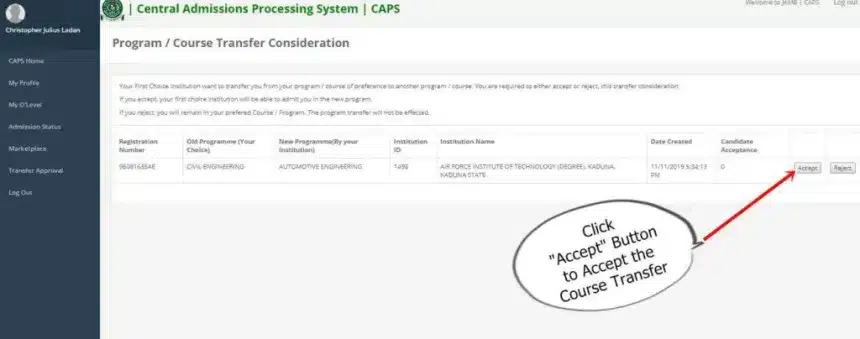
If offered a different course, go to “Transfer Approval” to decide.
Troubleshooting Common Issues
Issues? Here’s how to fix:
- Greyed-Out Buttons: No offer made; refresh and wait.
- Login Errors: Wrong credentials; reset password via email.
- Page Not Loading: Switch browsers or use incognito; try off-peak (midnight).
- Status Not Updating: After SMS accept/reject, wait 5-10 minutes and refresh.
- Mobile View Glitches: Always enable desktop mode on phones.
- No O-Level Uploaded: Status may show “Pending”; upload via portal or office.
For persistent problems, use COSS or visit a JAMB office.
This expanded guide, based on 2025 updates, ensures you’re fully prepared. Dr. Manny from Manny Spark has helped hundreds with this – contact 09051720414 for a walkthrough.
How to Accept or Reject Admission Offers on CAPS
Once admitted, act fast to secure or explore options!
- Accept: On the dashboard, click “Accept” to lock in. Alternatively, SMS “ACCEPT” to 55019/66019 from your registered SIM.
- Reject: Click “Reject” if unsatisfied (e.g., wrong course), entering the marketplace for alternatives. SMS “REJECT” similarly.
Important: Use your UTME-registered SIM for verification. After action, wait minutes, then check portal to confirm. Print admission letter post-acceptance.
Nigerian students should weigh options – accepting ties you; rejecting opens doors but risks no offer.
Quote from a JAMB official: “Timely acceptance ensures no loss of opportunity.”
If transferred to another course, review under “Transfer Approval” and decide.
At Manny Spark, we advise on these decisions, considering cut-offs and preferences. Call 08039822082.
How to Check Admission Status on JAMB CAPS Portal
Common Issues When Checking JAMB CAPS and Solutions
Beyond the guide, here are expanded solutions:
- “Module Temporarily Unavailable”: Server overload – try off-peak hours (midnight-6 AM) or USSD.
- Login Failure: Wrong details – reset or check SIM verification.
- “Not Admitted” Status: Wait; batches upload gradually. Check school portal too.
- Traffic Issues: Use SMS: Send “STATUS” to 55019.
- Lost SIM: Visit JAMB office for recovery or re-link.
- O-Level Mismatch: Upload correct results; mismatches cause “Pending.”
- Browser Compatibility: Avoid outdated browsers; update to latest versions.
Italic advice: Always screenshot statuses and errors for support tickets.
For persistent problems, submit a ticket via JAMB’s COSS or call support lines.
Manny Spark troubleshoots these – reach Dr. Manny

How to Check Admission Status on JAMB CAPS Portal
Tips for Nigerian Students to Navigate the University Admission Process
Success requires strategy in Nigeria’s competitive landscape:
- Prepare Early: Study JAMB syllabus; aim for 250+ in UTME to beat 2025 cut-offs.
- Choose Wisely: Select institutions based on cut-offs, catchment areas, and ELDS benefits.
- Post-UTME Prep: Many unis require this – practice past questions from UNILAG or UNN.
- Monitor Regularly: Check CAPS weekly during admission season (August-December 2025).
- Seek Guidance: Consult experts like at Manny Spark for mock sessions.
- Financial Planning: Explore scholarships; JAMB doesn’t cover fees, but TETFund aids.
- Health and Rest: Balance study with breaks to avoid burnout.
- Avoid Scams: Only use official channels; ignore “admission pushers.”
- Upload Documents Promptly: O-Levels and NIN early to prevent delays.
- Network: Join student groups on WhatsApp or Facebook for updates.
Bold emphasis: Leverage state quotas – e.g., southern students targeting northern unis for advantages.
For tailored tips, contact 08039822082 from Dr. Manny.
Internal Link: Check our post-UTME preparation guide.
FAQs: Answering Your Burning Questions About JAMB CAPS

Q: How often should I check CAPS? A: Daily during peak admission periods (August-November 2025). Statuses change dynamically.
Q: Can I check without internet? A: Yes, via SMS: “STATUS 2025” to 55019 or USSD *55019#.
Q: What if I reject an offer? A: Enter the transfer marketplace for other options; no reversal.
Q: Is CAPS free? A: Yes, but data/SMS costs apply. Admission letter printing requires payment.
Q: How to contact JAMB? A: Via offices, COSS portal, or hotlines.
Q: What if status is “Pending”? A: Ongoing process; upload O-Levels if needed.
Q: Why use CAPS? A: For transparency, real-time updates, and to avoid multiple admissions.
More FAQs? Ask Dr. Manny at Manny Spark – 09051720414.
[Image Placeholder: FAQ section graphic with question marks and answers.]
Key Takeaways
- Master the Basics: Understand JAMB’s history, CAPS features, and 2025 updates for context.
- Location Matters: Know your nearest JAMB office for hands-on help, like the Abuja HQ or Lagos annex, offering services from registration to troubleshooting.
- Step-by-Step Mastery: Follow computer, mobile, SMS/USSD methods precisely; interpret statuses like “AIP” and troubleshoot issues like grey buttons.
- Act on Offers: Accept/reject wisely via portal or SMS; print letters post-acceptance.
- Troubleshoot Proactively: Address common issues with alternatives like USSD for no-internet scenarios.
- Strategic Tips: Prepare holistically – from UTME study to scam avoidance and regular monitoring.
- Seek Expert Help: Contact Dr. Manny at Manny Spark (08039822082 or 09051720414) for guidance.
- Stay Informed: Use official links, check frequently, and upload docs early for success in Nigeria’s competitive admissions.
Related posts:




 Message Dr. MANNY on WhatsApp
QUICK TRANSFERS, Pay into this Account:
1481900827 | ACCESS BANK | EMMANUEL OLUWASEUN OTOBOR
Once your payment is successful kindly send the “PAST QUESTION” you need, your “ACCOUNT NAME” and “EMAIL ADDRESS” to 08039822082. or info@mannyspark.com
